
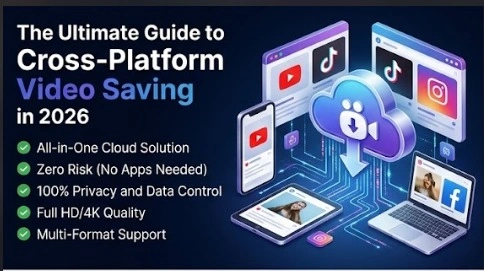
Have trouble saving good videos from social media? Offline saving is not very convenient on streaming networks. They want you to remain in their applications. For this reason they will prevent direct download buttons.
When using live internet, the media flow is low. Top posts are removed every day by creators. Links are not guaranteed. An important presentation or study session can be easily ruined by buffering.
There is no need to lose any files. To control your data, you need a smart web tool. The SaveXR Platform is the new standard for fast file saving. This guide is for all networks. Discover the easy and hassle-free way of saving clips safely.
One Tool for Every Network
Only a few download utilities can operate on a single site. Different apps require different pages to be opened. The SaveXR approach will change all that. All major social media channels are managed in our one and only cloud interface.
- YouTube Hub: Extract clips from the video or save background audio tracks in top quality.
- TikTok Engine: Extract high-quality videos without any floating watermarks.
- Instagram Saver: Download high-resolution Instagram Reels and video posts in seconds.
- Facebook Collector: Secure live streams and HD video clips.
- Snapchat Vault: Store snapshots of Stories and Spotlight every day before they disappear.
Why App Installs Introduce Big Risks
The number of users starts off with the media downloader at the app store. By making this selection, you risk using a mobile phone or computer that could be compromised.
Heavy tracking pipelines support the free standalone programs. They track your location. They read the text on your temporary clipboard. They read through your browser history and sell targeted ads.
Not only that, but many mobile apps require you to enter your private profile passwords. People are being banned because of sharing login information with external applications. People are being banned due to sharing login information with external apps. It also leads to serious identity theft.
SaveXR protects your hardware 100%. It is embedded in a secure web browser window. Does not access your private information, photos, or device settings.
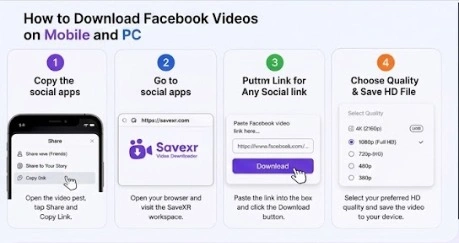
The Four Steps to Save Any Video
Our cloud server system does the heavy technical work for you. Your real workspace steps stay short and simple on all devices.
1. Copy the Video Link
Open your favorite social app. Find the specific video you want to keep. Tap the share arrow on the screen interface. Select the “Copy Link” command to save the path to your clipboard.
2. Open the SaveXR portal.
Launch a fresh browser tab on your phone or computer. Head straight to the SaveXR Hub. The page fits narrow phone screens and wide monitors automatically.
3. Paste the URL and Start the Scan
Tap inside the large processing field at the center of the screen. Paste your copied link string directly into the box. Click the action button labeled “Download” to trigger our server code.
4. Choose Your Quality and Save
Our backend engine reads the link layout within milliseconds. The screen will display your file options. Select your preferred resolution or audio format. Click the final download button to send the file straight to your storage drive.
Premium Media Formats at Your Fingertips
SaveXR gives you total control over file types. Cheap download sites restrict your options to save bandwidth. Our tool opens up the full stream details.
You can download video groups like MP4 and WebM. Quality ranges from standard definition up to crisp 1440p and full 4K resolution.
If you, as it were, require sound, SaveXR isolates the tracks cleanly. You can spare background sound specifically to MP3, M4A, or WAV records. This device is perfect for sparing lectures, podcasts, or music tracks for offline tuning in.
Why Cloud Web Engines Beat Local Software
The digital workspace changes fast this year. Social networks update their background security code weekly to stop scrapers. If you use a downloaded phone app, your tool breaks often. You must wait for manual developer updates to clear store reviews.
A web utility like SaveXR avoids this lag. We patch our extraction code on our servers the exact second a network shifts its layout. You never have to install a setup file or device patch.
Web utilities also save your device memory. They do not run background processes or drain your mobile battery. You get pure file extraction whenever you need it.
Fast Troubleshooting Checkpoints
If a video link fails to load, an external network barrier is usually the cause. Our conversion engine needs a clear public path to read file data. Check these three points to fix your download queue:
- Check Account Privacy: The target video must be public. If a poster limits their content to private friends, cloud servers cannot read the files.
- Use Fresh Links: Social networks refresh security tokens often. If you copy a link and wait hours to use it, the link can expire. Refresh the feed and copy a new path.
- Avoid Cutoff Text: Check your pasted link data. Missing a single letter at the end of the URL string causes the conversion engine to fail.
Conclusion
True file ownership means accessing your media on your own terms. Do not let platform shifts, network drops, or sudden content deletions dictate your viewing options. If a video holds real value for your career or creative growth, you should keep it safe locally.
Stop wasting time with slow, invasive store apps. Move your media tasks to a cleaner framework. Visit the SaveXR Portal right now. Paste your link path, pick your format, and build your permanent offline media library today. Ultimate data freedom is only one click away.