
Do your saved social videos look blurry? Does an annoying floating logo block the screen text?
Snapchat is a big hub for fast video content. Millions of unique clips hit the feed daily. However, keeping a clean copy of these files is very hard.
The application uses a fast expiration system. Clips disappear after 24 hours. If you try to save a video with basic tools, you hit a wall. The platform stamps a giant, moving watermark over your footage. It also ruins the file quality.
You do not have to settle for ruined clips. You do not need to install dangerous software either. This guide shows you a better way. You can use a high-performance Snapchat video downloader right inside your web browser. Save clean videos instantly. You never have to share your private password.
The Big Risk of App Installs and Account Logins
Many users check the app store first. They want to save mobile media fast. This choice introduces immediate dangers to your smartphone. It also puts your identity at risk.
Free standalone download apps survive on bad money models. They put tracking tools into your phone. They watch your location logs. They read your clipboard history. They track your web history constantly.
Even worse, many mobile tools force you to type your social media password. They claim it bypasses platform blocks. Never share your active password with an app. This practice triggers instant account bans. It leads to data leaks and identity theft.
A cloud-based Snapchat video downloader keeps your hardware safe. It extracts your files completely outside the platform. Your profile stays hidden and secure.
Real Quality: Why SaveXR Changes Everything
The conventional download sites are extremely aggravating. They pop up and block your screen with ads. They reduce your speeds. They require you to fall into paid subscription traps. SaveXR eliminates these barriers altogether.
The SaveXR web engine offers a fast and clean web environment. It has been designed to save files swiftly. The whole system is secure in your current browser tab. It acts as a standalone video extractor for all your favorite networks.
Our system delivers:
- True Quality: Extracts the key data layers to retrieve uncompressed data files.
- No Sign-Up Forms: There is no need to give an e-mail address to save media.
- No Account Login: Data from public pages is accessible. You do not type out your password.
- Fast Cloud Servers: Advanced nodes – your links converted into a file in seconds.
- No Daily Caps: No download limits, and enjoy free access.
How Original Bitrates Are Saved Losslessly
Why do cheap download tools deliver muddy, low-quality files? Most basic sites only scrape temporary preview files. They take them from the visual wrapper of the web page. They do this to save on their own data bills. You get a blurry file with bad audio.
An elite extraction framework talks directly to database endpoints. It bypasses user interface blocks entirely. The engine reads the hidden source data block. It finds the maximum resolution video file. It separates the clean visual frames from the audio track.
This process lets you capture top quality cleanly. The image details stay sharp. The text overlays remain easy to read. True file saving is vital if you collect editing references. It helps you build style folders or save helpful tutorials.
Get Your File in Under Sixty Seconds
Our servers take care of all the technical difficulties. You keep operating steps simple and concise on phones and computers.
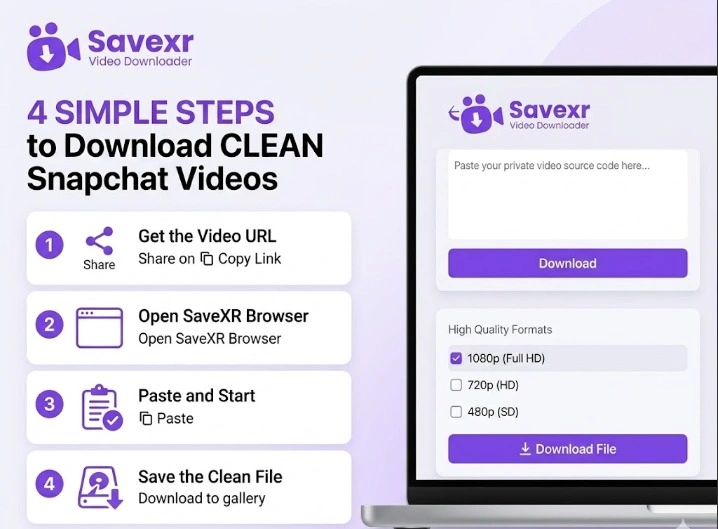
- Get the Video URL: Open your Snapchat app or website. Look for the particular clip that you wish to save. Tap the share bolt symbol on the screen. Press on “Duplicate Interface” to duplicate the way to the clipboard.
- Go to SaveXR: On your phone or computer, open a modern web browser window. Skip to the fundamental SaveXR entry. The page adapts to fit on small phones and big screens.
- Paste and Start: Tap in the big input box on the page. Copy and paste the link into the field. You select a specific video and click on the action button “Download.” You pick a video and click the “Download” action button of our scripts.
- Save the Clean File: Your quality options will be displayed on the screen. Choose the top choice. Press the last save button to directly download the clean, logo-less MP4 file to the device gallery.
The Technical Advantage of Cloud Engines over Software
The digital space moves very fast. Large networks change their internal server code weekly. This breaks standard download tools. If you rely on an installed phone app, your tool will break down often. You must wait for developers to push out manual update packages. App store reviews take days or weeks to clear.
SaveXR avoids this delay completely. We change our data handlers on our cloud servers instantly. This happens the exact second a platform shifts its layout. You never have to download a patch or installer file. Web tools also protect your hardware. Because SaveXR runs inside an isolated browser tab, it cannot view your private photos, messages, or saved device data.
Smart Workflows for Media Professionals
Local file storage offers real safety that live feeds cannot promise. Industry pros keep offline archives to run their workflows smoothly.
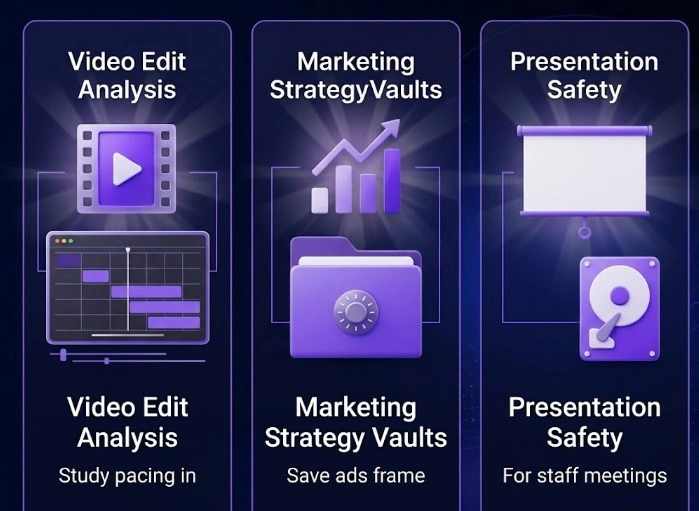
- Pacing and Edit Analysis: Video editors collect vertical clips to study editing styles and audio pacing. They need unwatermarked footage to work cleanly. A reliable downloader gives them raw files for editing apps.
- Creative Strategy Vaults: Marketing teams save top-performing video ads to build style guides. You cannot study a creative plan if a brand deletes the post next week. Local saving protects your research.
- Presentation Safety: Speakers use popular clips to highlight points during big staff meetings. Relying on live internet inside a large hall is dangerous. Local networks often slow down under heavy use. Fetching your files early keeps your event moving perfectly.
Three Quick Fixes for Processing Errors
If a link errors out during a download, an external platform barrier is usually the cause. A premium utility needs an open public path to read media details accurately. Check these three points to clear your queue:
- Check Profile Privacy: The target video must be public. If a creator sets their account to private, cloud servers are blocked from reading the source data.
- Avoid Old Links: Social networks change security strings often. If you copy a link and wait hours before pasting it, the token can expire. Simply refresh the feed and copy a fresh link.
- Watch for Cutoff Text: Double-check your pasted clipboard data. Missing even a single letter at the end of the URL text will cause a loading error.
Own Your Media Portfolio Permanently
Do not let platform changes, short timers, or ugly watermarks ruin your media quality. If you find real value in a clip or a helpful tutorial, you should have the power to keep it. Hold it locally in its best format forever.
Stop wasting your time with slow, dangerous store apps that look at your private data. Move your daily work to a faster, cleaner system.
Visit the SaveXR Hub right now. Paste your video link path, pick your quality preference, and use our premium Snapchat video downloader to secure your clean video library today. True file control is just one click away.